Step 1

Upload clear photos of both parents
Choose recent, front-facing photos where each face is easy to see. Natural light and a neutral expression usually help.
Free to try
Upload photos of both parents and get a realistic baby face preview in under a minute. Baby Generator gives couples and families a fast, simple way to imagine a future child.
No signup required to start. Best results come from clear, front-facing photos.
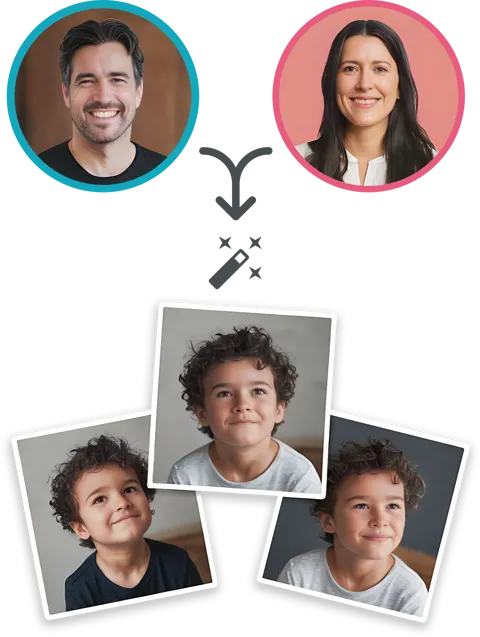
Upload one clear photo of each parent to get a realistic baby face preview. The tool works best when both faces are easy to see and the photos are recent, bright, and front-facing.
Upload Parent 1 Photo
Upload Parent 2 Photo
Use clear, front-facing photos with soft light and minimal obstructions for the most natural result.
Baby Gender
Age Stage
Share The Reveal
Copy the link, open the public baby page, or send it straight to your partner, friends, or family.
Optional: add parent photos
Parent photos stay private by default. Turn this on only if you want both photos displayed on the public baby page.
Three simple steps from photo upload to baby face preview.
Choose recent, front-facing photos where each face is easy to see. Natural light and a neutral expression usually help.

The tool compares visible facial structure, proportions, and details from both photos to build a realistic baby face preview.

In under a minute, you will get a baby face image you can save, compare, or share.
One clear portrait per parent gives the preview a cleaner starting point right away.
Similar framing makes it easier to compare visible facial structure between both photos.
Covered faces hide the details the tool needs in order to build a more natural-looking result.
Balanced light usually preserves sharper detail, softer skin tone, and clearer face shape.
Different parent photos can lead to different kinds of baby previews. Clear, front-facing portraits usually produce the most believable result.


Balanced lighting usually creates sharper baby details.


Softer source photos can lead to a gentler result.


Front-facing portraits often produce the clearest preview.
Baby Generator works from two parent photos and creates a baby face preview based on visible facial traits.
Most generations are usually ready in under a minute, so you can try different photo pairs without a long wait.
The goal is a believable baby face preview that feels warm, soft, and easy to imagine sharing with your partner or family.
Upload two photos, generate your result, and keep the process easy from start to finish.
Start with a free try, then unlock more generations when you want to test more photo combinations or keep exploring results.
Try baby generation for free
Perfect for personal use
Best value for families
People usually start with curiosity, then end up sharing the result with someone close to them.
"We tried it just for fun and ended up talking about the result for way longer than we expected."
"The preview felt soft, believable, and easy to imagine as part of our future."
"It was quick to use, easy to understand, and surprisingly fun to compare different photo pairs."
If you want a direct answer to that question, visit our What Will My Baby Look Like guide. It explains what an AI preview can show and how to get a more believable result from two parent photos.
Clear, front-facing photos with good lighting usually work best. For a deeper face-focused breakdown, read our baby face generator guide.
No. It is a visual AI preview designed for fun, curiosity, and sharing.
Most results are ready in under a minute.
Yes. You can start with a free try and unlock more generations if you want more results.
The experience is designed to be simple and privacy-conscious, with clear user-facing handling of uploaded images.
For the full list, visit the full FAQ.
Related Guides
Learn more about what a baby preview can show and which photo choices usually create a more believable result.
Upload two photos and see what your future baby could look like in under a minute.